月历系统

作者: April & May & June

  • 精神疾病自主医疗 – 抗焦虑及安眠药

    精神疾病自主医疗 – 抗焦虑及安眠药

    PS: 该文章仅基于本系统经验所作,并非完全正确,且未参考专业资料、无专业价值。

    苯二氮䓬类

    苯二氮䓬(BZD)类药物直接作用于GABA受体,是目前国内最广泛使用的抗焦虑及安眠药,也是前一代药物巴比妥类的继任者。相比巴比妥类,bzd更加安全,过量服用后的副作用远小于前者。bzd类药物常常以“某某西泮”或“某某唑仑”命名。

    国内常见的苯二氮䓬类药物有:阿普唑仑、劳拉西泮、奥沙西泮、氯硝西泮等。这些药物的剂量、半衰期、作用时长等都可以在Psychonaut Wiki上找到。

    我们强烈建议任何使用安眠药/镇静剂的朋友下载并使用Psychonaut Wiki Journal,它提供可视化、交互式的药物剂量、效果、时长、联用反应、耐药性的计算与查询,并提供减害方案。

    不同药物的作用时长与起效速度不一。例如劳拉西泮起效速度快、持续时间短,适合帮助入睡、短期抗焦虑;奥沙西泮起效慢、持续时间长,适合用于稳定睡眠。和医生沟通时,请务必说清楚你的病情是“难以入睡”、“睡眠质量差”还是“早醒”,不要简单的说“睡眠不好”,从而让医生更好的判断并开药。

    当用于焦虑障碍时,医生往往根据焦虑类型的不同而选择不同的BZD药物。短期发作式的则使用劳拉西泮或阿普唑仑,长期持续型的则使用氯硝西泮。针对焦虑障碍的BZD用量往往比安眠所用的少,但仍然会有嗜睡的副作用。

    BZD类药物很容易产生耐药性。减轻这种耐药性的办法只有加量,或者暂时摆脱它一段时间——耐药性7天减半,两周归零。注意,BZD类药物的耐药性是共享的,假如你吃了氯硝西泮,那么你对阿普唑仑的耐药性也会上升。因此,长期睡眠障碍的患者往往会持有多种不同类型的安眠药,通过在不同种类安眠药间的轮换来规避耐药性问题。

    新型安眠药(z-drugs)

    进入新世纪,人们在苯二氮䓬类的基础上又开发出了另一些不完全直接作用于GABA受体的安眠药物,它们只有三种:唑吡坦(思诺思)、佐匹克隆、扎来普隆。

    • 唑吡坦(思诺思)
      药效约3小时,起效速度快,可以辅助入眠。服用后不睡的话可能导致明显幻觉,其类似于睡前幻觉,和精神分裂型幻觉有所不同
    • 佐匹克隆
      药效约6小时,可以用于稳定睡眠。其特征是苦,非常非常苦的那种
    • 扎来普隆
      药效只有短短的一个小时,且在国内多为分散片,主要用于迅速入眠

    抗组胺类药物(安眠)

    抗组胺类药物主要有米氮平、奥氮平、喹硫平等。它们拮抗中枢组织胺,会使人产生时间较长、较为稳定的睡眠,且不像bzd类药物,它们极不容易耐药。副作用是这样的睡眠往往:

    • 时间过长
    • 难以自然醒来
    • 做梦,陷入梦境中无法醒来

    因此,“安眠”常常是这些药物的“副作用”,而将其用于治疗睡眠障碍则是超说明书用药的部分。

    对于重度睡眠障碍患者,喹硫平往往是一个好的选择。100mg的喹硫平往往足以保证8小时的睡眠,是一种不错的长效安眠药。

    丁螺环酮/坦度螺酮(抗焦虑)

    丁螺环酮/坦度螺酮也是国内常用的抗焦虑药,其机理为通过对血清素5-HT1A受体的不断激动使其“脱敏”,进而减少其激活,从而由血清素渠道减轻患者的焦虑障碍。

    由于机理特殊,丁螺环酮/坦度螺酮的适用性也因人而异。在笔者所见的大部分个案身上,丁螺环酮都是几乎无效的。但鉴于其副作用小、对身体伤害小,进行尝试没有坏处。

    若要服用丁螺环酮,请务必连续稳定服用40天以上再看效果。否则丁螺环酮无法对血清素受体起到完全作用。

    普瑞巴林(抗焦虑)

    是的,普瑞巴林也可以用于抗焦虑——所有加巴喷丁类药物都可以,因为它们也是作用于GABA受体的镇静剂。这也是为什么有些人od普瑞巴林后感到焦虑消失、心情舒畅的原因。相比BZD类,它没有嗜睡的副作用;相比丁螺环酮,它治疗效果好并且可以立即生效。

    普瑞巴林(英语:Pregabalin), 原研药商品名乐瑞卡(英语:Lyrica),是一款被用作治疗癫痫神经性疼痛纤维肌痛广泛性焦虑症[7][8]的药物。

    ——维基百科

    使用普瑞巴林对抗广泛性焦虑障碍的用药方法(兔子处方)为早150mg,晚150mg。从身边人经验看较为有效。如果你也患有长时间发作的广泛性焦虑障碍,不妨和医生提议尝试。

    其它

    可持续性兔耳生长技术——我和水合氯醛的两年(未来还会有更多)

  • 精神疾病自主医疗-心境稳定剂

    精神疾病自主医疗-心境稳定剂

    PS: 该文章仅基于本系统经验所作,并非完全正确,且未参考专业资料、无专业价值。

    1. 碳酸锂缓释片
    2. 丙戊酸盐缓释片
    3. 以抗精神病药作为心境稳定剂
    4. 其它

    碳酸锂缓释片

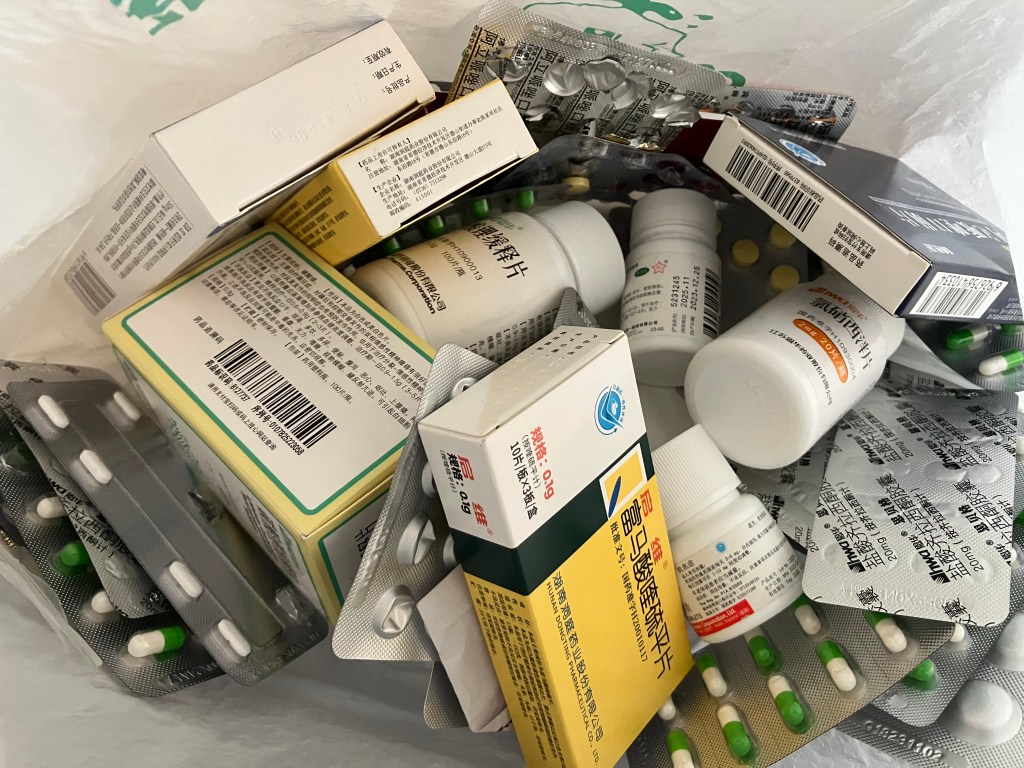
    头图即为国内最常见的恩华300mg碳酸锂缓释片

    锂盐是最经典的心境稳定剂,其作用原理简单粗暴:以锂离子代替神经元中的钠钾离子,从而降低神经元的活动性。它被大量用于治疗双相情感障碍、环性心境障碍、分裂情感性障碍,以及防止单相抑郁发展为双相的辅助性治疗。针对体重30kg以上的患者,用药一般为一天两次、一次一片。

    除治疗双相外,根据其治疗原理及我们身边人的亲身经验,心境稳定剂也有一定的减轻来自现实的刺激的功能。因此,针对包括分离障碍、应激障碍、PTSD、焦虑等症状,我们也会视情况推荐服用碳酸锂,甚至将碳酸锂作为脱离紧急状态的“逃走药”之一,起到了相当的作用。

    同时,锂盐完全通过肾脏代谢,不影响肝脏,对身体器官的压力小。若同时服用多种药物,推荐使用碳酸锂作为心境稳定剂/抗抑郁药,以减轻肝脏压力。

    注意,碳酸锂的安全剂量区间非常小。以恩华的300mg缓释片为例,一次服用两片及以上即会锂中毒。因此,除非你对自己的体重很有信心,切勿将早晚两片合并成一次服用切勿补服。若每天服用两次碳酸锂,则尽量确保两次服药间隔贴近12小时。此外,长期服用碳酸锂时尽量定期去医院检测血锂浓度,并让医生根据血锂浓度对用药进行调整。

    锂中毒的症状有:头晕、恶心、呕吐、眩晕、手抖、思维迟缓、智力降低等。服用锂盐时请密切观察是否出现这些症状,若不幸进入轻度锂中毒的状态,大量喝水可以加速锂盐的代谢。严重中毒时请立即送医。

    1. 非中毒的治疗剂量下,碳酸锂是不会造成智力受损的
    2. 某些医生可能会对体重不足的患者仍开出早1片、晚2片的碳酸锂处方,其核心思想为趁碳酸锂血药浓度上升前赌患者可以睡着,从而避免患者在有知觉时面对可能的轻微中毒反应。我们不推荐这么做,除非您的体重已经达到80公斤及以上。若要一天服用三片碳酸锂,请尽量每8小时服用一次,且切勿补服。
    3. 切勿使用碳酸锂自杀!大剂量碳酸锂会产生极其剧烈的呕吐反应,同时中毒反应会让人感到痛不欲生,锂盐彻底摧毁人的神经系统也需要很长的时间,可谓是最痛苦的死法之一。同时,大剂量碳酸锂中毒会导致不可逆的大脑和智力损伤,被救回来后依旧十分痛苦。任何一种自杀方式都比吞服碳酸锂要强。

    丙戊酸盐缓释片

    国内销售的丙戊酸盐类药物主要有丙戊酸钠(德巴金)和丙戊酸镁(神泰或宝庆)。

    相比碳酸锂,丙戊酸盐的主要优势即为毒副作用小,可以防止患者冲动吞药引发危险后果的情况。

    丙戊酸盐通过肝脏代谢,如果患者服用药物过多、肝脏压力大,则不推荐丙戊酸盐。

    丙戊酸盐的剂量为每日20~30mg每公斤体重,常见处方为200mg片每日2-3次、每次1-2片。应当根据个人体重适当调整剂量,否则丙戊酸盐无法达到治疗效果。

    1. 可以逐渐加量以适应药物带来的感受
    2. 某些医生会无脑给患者开每日两次、每次一片200mg片的处方,忽略患者的体重,这是不对的,记得自己主动增加剂量,否则你会感觉它像淀粉片子一般毫无作用。

    以抗精神病药作为心境稳定剂

    双相情感障碍与精神病性障碍具有一定的相关性,例如双相I型障碍的躁狂发作中常见精神病性特征。事实上,许多抗精神病药由于对多巴胺及其它受体的拮抗作用,其本身就具有一定稳定心境的功能。因此,临床上经常使用抗精神病药作为心境稳定剂,相关用法在说明书上也有表示。

    常被国内精神科同时用作稳定心境的抗精神病药有:

    • 喹硫平(同时安眠)
    • 阿立哌唑
    • 利培酮
    • 奥氮平 (同时安眠)

    等等。

    某些抗精神病药的药效很“脏”——它会拮抗大量的受体(尤其是多巴胺受体),对脑环境产生剧烈的改变,例如喹硫平。许多人讨厌这种感觉,但也有认为这种药效带来了“平静”的患者。

    其它

    还有一些心境稳定剂,例如卡马西平、拉莫三嗪等,它们往往同时是抗癫痫药。更多请见维基百科

  • 精神疾病自主医疗 – 抗抑郁药

    精神疾病自主医疗 – 抗抑郁药

    PS: 该文章仅基于本系统经验所作,并非完全正确,且未参考专业资料、无专业价值。

    1. SSRI
    2. 如果SSRI没用怎么办
    3. 服药有规则
    4. 如何断药

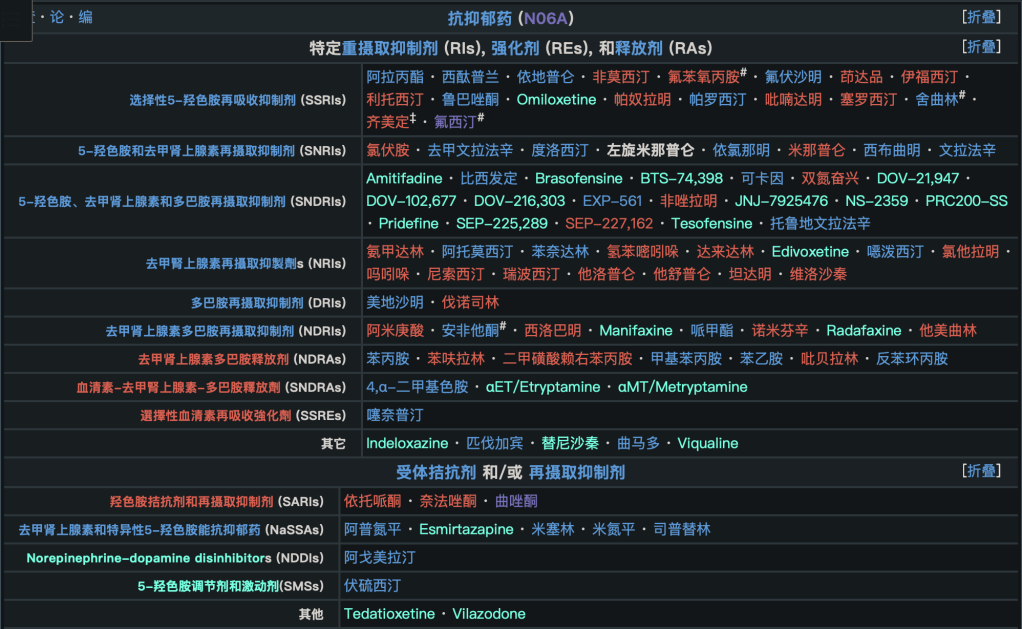
    与情感相关的神经递质有血清素、去甲肾上腺素、多巴胺,那么提升它们三个的就有这么几种种药物:SSRI(选择性血清素再摄取抑制剂)、SNRI(血清素及去甲肾上腺素再摄取抑制剂)、NRI(去甲肾上腺素再摄取抑制剂)、NDRI(去甲肾上腺素及多巴胺再摄取抑制剂),等等。更多的请参见维基百科

    为什么大都是“再摄取抑制剂”?

    大脑是个很精密的东西,能承受的神经递质数量很少、区间很小、并且因人而异,直接往脑子里灌神经递质是很危险的:过量的神经递质会直接烧毁受体,从而再也无法治疗。所以我们都是通过减少大脑对现有神经递质的回收,让它们在脑子里多待一会儿,从而增加神经递质浓度的。

    不过我们也有这样的药物就是了,它们的名字一般叫“多巴胺释放剂”,其中的典型药物为甲基苯丙胺。从各种意义上讲我们都不推荐尝试,well。

    SSRI

    大部分人去医院首诊抑郁都是从吃SSRI开始——学界普遍认为多数人的抑郁都是血清素能缺乏导致的。国内SSRI主要有五种,也被称为“五朵金花”:舍曲林、西酞普兰、氟西汀、帕罗西汀、氟伏沙明。它们疗效好、副作用小、生产成本低。我们也推荐抗抑郁先从这五种开始。

    此外还有一种和SSRI很类似的,叫做四环类药物,因其分子上有四个环而得名。这种药主要有米氮平和米安色林,米氮平是米安色林的升级版本。

    对药物的称呼有一定的讲究。例如“草酸艾司西酞普兰”,“草酸”是修饰分子用的根离子,它没有意义;“艾司”即“S”的音译,代表分子的手性(对称性),和“右佐匹克隆”中的“右”相同,指的是该药物为纯右手螺旋分子;而“西酞普兰”才是该分子的称呼。

    有人管“草酸艾司西酞普兰”叫“草酸”,管“马来酸氟伏沙明”叫“马来酸”,这是非常不好的习惯,就像管补佳乐叫“戊酸”一样。我们对此表示强烈谴责。

    如果你同时患有惊恐和焦虑,那推荐西酞普兰;如果你患有强迫障碍,或者常见侵入性思维,那么则推荐氟伏沙明。如果同时伴随睡眠障碍,那么推荐米氮平,它同时拥有安眠的效果(抗组胺)。

    1. 请注意,SSRI类药物有一项普遍副作用:性功能障碍(性欲减退、性快感缺失)。如果你有强烈的性需求,请参考下方第二节《如果SSRI没用怎么办》。
    2. SSRI类药物普遍具有一定的肠胃刺激性,推荐在饭后服用

    关于抗组胺类安眠药物的综述将会在后续文章中给出

    如果SSRI没用怎么办

    一般的治疗程序是,先服用2-3种SSRI,各连续服用两周以上,评估疗效。若没有疗效,则需要换SNRI和NDRI了。之所以不第一顺位推荐这两种抗抑郁药,则是由于它们或多或少都有一些严重的副作用:

    • SNRI
      • 文拉法辛
        如果你吃SSRI没用,那它将会是大概率有效的药物之一。大剂量(150mg/d+)的文拉法辛同时还有抗焦虑的超说明书作用。
        • 用法:每天50mg开始,数日后加量至每天150mg。极端情况下可以加量至每天300mg。最好白天服用,因为可能导致难以入睡
        • 副作用:极其严重的断药反应

        注意,目前中国已经出现了地文拉法辛的国产原研药。地文拉法辛(或者叫“去甲文拉法辛”)是文拉法辛的第一次代谢产物,也是文拉法辛中真正起作用的部分。药品名为“琥珀酸地文拉法辛缓释片”。相比普通的盐酸文拉法辛缓释片,地文拉法辛价格不算贵、疗效更好,同时副作用更小、断药反应也更小(个人体验几乎没有)。用法为每日50mg(一片)。

      • 度洛西汀
        • 用法:每天30mg开始,数日后加量至60mg稳定治疗
        • 副作用:性欲减退,断药反应
    • NDRI
      • 安非他酮
        如果你感觉你的症状和多巴胺缺乏有关的话,那它大概率有效
        • 用法:每天75mg开始,数日后可以加量至150mg缓释。极端情况可以加量至每天300mg缓释。密切监控可能的癫痫症状
        • 副作用:诱发癫痫,并导致继发性癫痫

          笔者连续两日75mg安非他酮导致了癫痫发作,此后不断出现继发性癫痫症状。

    • NRI
      • 托莫西汀
        虽然更多地被当作ADHD药物使用,但作为去甲肾上腺素的强力再摄取抑制剂,也拥有一定的抗抑郁功效
        • 用法:每天25mg开始,数日习惯后可以加量至50mg。最好饭后服用,由于肠胃刺激性
        • 副作用:心率升高;肠胃刺激性;必须以ADHD的名义开处方
    • 其它
      • 曲唑酮
        一般拿来增强其它抗抑郁药,以及安眠(抗组胺)
      • 阿戈美拉汀
        仅作用于某一特殊的血清素通道,一般拿来安眠(褪黑素类似物)
      • 伏硫西汀
        “血清素调节剂”,效果显著且毫无副作用,缺点是800-1000人民币一个月

      此处列出的仅为笔者吃过的/熟悉的药物。某些抗抑郁药(例如米那普伦)由于笔者并不熟悉而未列出。更多信息请参见英文维基百科对各类药物的统计与药理介绍。

    服药有规则

    所有抗抑郁药物都需要至少两个星期的时间才能有可见的效果,所以每次服药必须坚持两星期及以上。随意断药会有诱发双相的可能性哦

    如果某一天忘记吃抗抑郁药了可以补服,大部分抗抑郁药的半衰期普遍较长,例如舍曲林的半衰期能达到40+的程度。SNRI、NDRI往往具有更短的半衰期,当错过服药时间后就会出现断药反应,此时应立即补服,等候断药反应消失。

    不要吞药,吞多少都死不了的。所有抗抑郁药为了防止可能的自杀风险都会添加催吐剂,或以其它方式确保吞药后存活。

    为什么抗抑郁药反而会导致自杀?

    抑郁分为轻度、中度、重度三个阶段。和常识相悖,自杀风险最高的抑郁阶段反而并非重度,而是轻度转中度、重度转中度两个中间阶段。对重度抑郁患者而言,抗抑郁药会首先改善患者的行动能力,再在数天后逐步改善患者的情绪。此时患者脱离了“无力自杀”的困境,却又存在严重的自杀想法,因此自杀率会比重度抑郁时更高。

    此外针对SSRI,于某些抑郁症患者而言,SSRI会导致大脑血清素能的过度提升,从而诱发双相情感障碍甚至血清素综合症(血清素综合症是一种十分危险的、严重会危及生命的疾病)。笔者曾见过摄入治疗剂量上限值的舍曲林后罹患轻度血清素综合症的极端例子。此外,统计学研究也表明SSRI会显著增加患者的自杀概率。因此,尽管十分常见且副作用相对较小,服用起SSRI来仍需小心,并及时监控自己的身心状态。

    如何断药

    精神科药物基本都遵循“逐步减量”的例子——不断减半再减半,直到彻底停止。不同的药物因半衰期不同、身体适应性不同,减半间隔也有所不同,但大体可以以一周为间隔。如果你的药物中间有割痕,则可以掰成两半服用;或者购买单位更小的药物。这样做的目的是最小化断药后的不适反应——失眠、噩梦、情绪低落、惊恐等。对于断药反应严重的药物而言,这一点格外重要。

    同样的,千万不要在断药后反复偶尔服药,这样依然有重新患上抑郁症甚至双相情感障碍的风险。

    针对断药,这个网站可以提供一定的社群支持,英文好的朋友可以去看一看。(感谢@Bolack_AiDieck

  • 精神疾病自主医疗 – 神经递质

    精神疾病自主医疗 – 神经递质

    PS: 该文章仅基于本系统经验所作,并非完全正确,且未参考专业资料、无专业价值。

    要治愈自己的精神疾病,首先要明白精神问题是怎么产生的。

    情感与抑郁

    人的大脑里主要有三种“神经递质”(可以控制神经细胞行为的分子)会影响人的情绪:五羟色胺(血清素、Serotonin、5-HT)、去甲肾上腺素(NA)和多巴胺(Dopamine)。大脑的情绪控制中枢拥有针对这几种神经递质的受体,受体接收到这些分子之后就会改变其行为方式,这就是它们影响情绪的原因。一般而言,我们说五羟色胺可以使人感到幸福,去甲肾上腺素可以激发人的求生意志,而多巴胺可以产生快感。这三种感受都可以让人愿意活下去。

    抑郁症的原因大部分即为这三种神经递质:1)不足;2)受体不敏感,而解决这两种问题的方法都是:增加血液中该神经递质的数量。

    双相情感障碍

    有些时候,一些人会无缘无故地陷入抑郁-兴奋的循环之中。精神医学中的“兴奋”指的不只是“开心”而是“活跃”,非常积极地想去死也算兴奋的一种。这种兴奋与抑郁交替的周期短则两三天,长则数星期,我们管它叫躁狂(如果不影响生活则为轻躁狂),这种循环则被称为双相情感障碍。

    它的病因甚至是尚不明确的。许多人认为它也和神经递质的波动有关,但它的治疗手段是与神经递质无关的,而是粗暴地降低神经元的活动性——通过一种叫“心境稳定剂”的药物。我们会在以后的文章中陈述。

    睡眠与焦虑障碍

    人的脑神经里有一种特别的受体,叫做GABA(γ-氨基丁酸)受体。这些受体可以接收某些分子从而被激活。而它被激活后的效果就是让神经元镇静下来。激活GABA受体是人类唯一广泛使用的镇静方法。

    焦虑的本质是某些神经元被过度激活;睡眠障碍的本质也是神经元难以进入镇静状态,因此GABA受体激动剂对它们都有效果。

    针对睡眠障碍,除了GABA受体,组胺H1拮抗剂也有一定的安眠效果;褪黑素亦有。它们也是人类目前唯有的三种针对睡眠障碍的治疗途径。

    精神分裂(思觉失调)

    很多人以为精神分裂型障碍仅仅是单纯的幻觉和妄想,这其实是不对的。精神分裂分为阳性和阴性症状,阴性症状中包括思维干扰、语言感受与表达障碍等。具体症状列表请参见维基百科

    精神分裂症被认为和谷氨酸与多巴胺有关,主要是大脑某区域中多巴胺D2受体过于敏感所导致的。于是,所有抗精神病药(Antipsychotic,专指抗精神分裂用药)都属于多巴胺D1受体拮抗剂。

    你可能听说过“锥体外系反应”这个在治疗精分时会出现的名词。它的症状是肌肉不受控制地紧张,如牙齿不受控地咬紧、脖子向一边扭、腿不可控地紧绷到抽筋等。这是由于多巴胺不仅对精神分裂有影响,它还控制着人脑的运动系统(帕金森症就是多巴胺缺乏所导致的)。

    人们目前研发出一些新的药品,被称作“非典型性抗精神病药”(说白了就是 新型 的意思)。它们除了作为多巴胺D1拮抗剂,还是5HT-2A受体激动剂,而后者同时也负责控制运动中枢。两者同时作用下,锥体外系反应会大幅度降低。

    虽然名字叫“非典型”,但这些药物已经临床应用几十年了,你几乎无法再在门诊部找到“典型抗精神病药”,所以大可不必担心。如果出现轻度的锥体外系反应,稍微忍受一两天即可消失,实在难以忍受的话可以买少量的苯海索服用,它有肌肉松弛的效果。当然,别忘了复诊,如果你有医生(或“医生”)的话。

    (未完待续)

  • Common Lisp 学习资源目录

    Common Lisp 学习资源目录

    写这个的原因是Common Lisp往往难以学习,资源过于松散,且对中文用户来说尤其难以上手。很多时候我们只需要一个目录,告诉我们所有应该存在的东西都在哪里,便可以顺藤摸瓜、步步高升。希望这个目录能起到这样的作用。

    基础语法

    Lisp实现

    现实应用指导

    包管理器

    • Quicklisp 是社区标准的包管理器
    • Ultralisp是Quicklisp的一个更新更及时的第三方源

    社区内容

    • awesome-cl优秀的社区库、书籍、项目和教程集合
    • Quickdocks用于搜索Quicklisp上的社区库

    标准参考

  • LW Editor Functions not in Manual

    LW Editor Functions not in Manual

    📤: Symbol has exported from EDITOR package;

    ❎: Definition is not contained in Editor source code;

    Movement

    Regular

    (point-before point) & (point-after point)

    Move the POINT 1 character before / after. Like a shorthand of character-offset N=1 or -1 but slightly faster.

    ❎(move-to-column point column &optional (line (point-bigline point)))

    Move the POINT to the COLUMN of its current regular line.

    (move-point-to-offset point offset)

    Move the POINT to the OFFSET position of current buffer. Similar with (setf point-position), but must be called with the buffer locked.

    ❎(FIND-PREVIOUS-CHARACTER POINT CHAR) & (FIND-NEXT-CHARACTER POINT CHAR)

    Search character CHAR before / after the POINT. Return non-NIL and move the POINT to the position of that character if found, return NIL otherwise.

    The value succesfully returned is a POINT, but it probably is not the same point with POINT and can be invalid, so do not use it.

    Pixelwise

    (cursorpos-to-point px y window &optional point)

    Giving X position in pixels, Y in line-number, relative with WINDOW, return a nearest point of the position. If POINT is a valid editor point, move the POINT to that position instead of return a new point.

    Must be called with both window and buffer locked. See Locking Window.

    ❎(point-to-cursorpos point window)

    Return 5 values: The horizontal character offset and vertical character offset of the POINT, relative with the visible area of WINDOW; The character at that point; The editor face at that point; The position of that point at its buffer (= how many characters before it).

    ❎(point-to-xy-pixels window point)

    Return the horizontal and vertical position of POINT in pixels, relative with the visible area of WINDOW, as 2 values.

    Search

    Some source are inside searchcom.lisp of the Editor source code.

    Programmatically search

    Use get-search-pattern (or new-search-pattern) and find-pattern to search through buffer programmatically.

    (GET-SEARCH-PATTERN STRING DIRECTION &OPTIONAL USER-GIVEN)

    Make a new search-pattern using STRING and DIRECTION. DIRECTION can be :forward, :forward-regexp, :backward, :backward-regexp. If DIRECTION is :forward-regexp or :backward-regexp, treat STRING as a LW regular expression and search with the expression. If DIRECTION is not indicate a RegEXP, search string in the way specified by default-search-kind Editor variable (:string-insensitive by default).

    Calling new-search-pattern under the hood.

    ❎(NEW-SEARCH-PATTERN KIND DIRECTION PATTERN &OPTIONAL RESULT-SEARCH-PATTERN)

    Return a newly constructed search-pattern.

    KIND can be one of :string-sensitive, :string-insensitive and :string-regexp;

    DIRECTION can be one of :forward and :backward;

    PATTERN can be a string.

    ❎(FIND-PATTERN POINT SEARCH-PATTERN &OPTIONAL LIMIT)

    Find the SEARCH-PATTERN 1 time, starting at POINT. LIMIT should be a point if provided.

    If success, POINT will be moved to the beginning (lower position, no matter which direction) of the match, and return the length of the match (a number). Unless NIL and the POINT will not be moved.

    (FIND-REGEXP-PATTERN POINT PATTERN FORWARDP TEXT-END &OPTIONAL TEXT-START)

    Find regex pattern starting at POINT.

    PATTERN must be a LW precompiled regular-expression

    TEXT-END should be a point, indicating the search limit.

    This function must be called inside a lock. It can be more efficient than find-pattern if you’re reusing the precompiled regex.

    The two functions use the same function to handle Regex search under the hood: find-regexp-pattern-from-line and underlying search-for-regexp. *search-pattern-experts* seems contain handlers for find-pattern.

    Insertion & Deletion

    • 📤❎(INSERT-STRING POINT STRING &OPTIONAL START END)
    • 📤❎(INSERT-THINGS POINT &REST THINGS)
      Things can be a sequence of characters & strings.
    • 📤❎(INSERT-CHARACTER POINT CHARACTER &OPTIONAL COMBINE-CHAR)
    • 📤❎(INSERT-FORM-AT-POINT POINT FORM)
      Insert quoted sexp FORM at point. FORM will be pretty-printed. Used in showing macroexpand / form walking output.
    • 📤❎(DELETE-BETWEEN-POINTS START END &OPTIONAL DELETED-STRING)
    • ❎(INSERT-SPACES POINT NUM)
      Shorthand for inserting a NUM of spaces
    • ❎(DELETE-CHARACTERS POINT &OPTIONAL (N 1))
      Delete N character from POINT. Positive to delete forward, negative to backward.
    • ❎(BIGLINE-REPLACE-CHARACTERS BUFFER BIGLINE START STRING STROFF LEN)
      Bigline-related function to replace characters directly in region. STRING should be a buffer-string, STROFF is the starting-offset of STRING, LEN is the length of characters need to be replaced. Must be called inside a lock.

    Window

    Locking Window

    It seems that only 2 functions for window locking are reserved:

    ❎(lock-window-and-call func window)

    Lock WINDOW and call FUNC. FUNC is called with one argument that’s the WINDOW itself.

    (call-with-window-and-buffer-locked window timeout function arg)

    Lock WINDOW, and lock BUFFER as for modification, then call FUNCTION with ARG. The FUNCTION will receive 3 arguments: WINDOW, BUFFER and ARG.

    Text Property

    The text property of the buffer are constructed by a continuous sequence of text-property-regions, splitted by text-property-point. See the notes at the head of text-properties.lisp of the Editor source code.

    The text-property content is a plist that can hold any keys and values. the 'editor::face property is used to implement face facility of LW Editor.

    📤Interface Functions

    They’re same with Emacs’s corresponding functions. Notes that all points are editor:point.

    If modification is non-NIL, the change (of-course include the change of text properties) of the function made will be recorded into buffer’s undo history using record-text-property-undo.

    When modifying the value of a property using functions like put-text-property and alter-text-property, make sure you are giving them a fresh-new object, but not the original object modified, e.g. modified list using nconc or delete.

    That’s because these functions will merge the text-property-regions automatically, by comparing if two value objects are same using EQ (inside the same-properties-p function). Thus if you give a original object modified, the region of your modification may expand to its neighbours.

    • (get-text-property point prop)
    • (add-text-properties start end properties &key (test ‘eql) (modification t))
    • (remove-text-properties start end properties &key (modification t))
    • (remove-text-properties-no-edit start end properties)
      Shorthand of (remove-text-properties start end properties :modification t)
    • (set-text-properties start end properties &key (modification t))
    • (put-text-property start end property value &key (modification t))
    • (put-text-property-no-edit start end property value)
      Shorthand of (put-text-property start end property value :modification t)
    • (alter-text-property from to prop func &key (test ‘eql) remove-nil-p (modification t))
    • (merge-text-property-list start end property value &key (modification t) (test ‘eql))
    • (merge-face-property start end face &key (modification t))
      Shorthand of (merge-text-property-list start end 'editor::face value)
    • (text-properties-at point)
    • (text-property-any point property value &key (test ‘eql) limit)
    • (text-property-not-all point property value &key (test ‘eql) limit no-move)
    • (next-property-change point &key limit)
    • (next-single-property-change point prop &key limit (test ‘eql) no-move)
    • (previous-property-change point &key limit)
    • (previous-single-property-change point prop &key limit (test ‘eql))
    • (list-text-properties-at &optional (point (current-point)))
      Will pop-up an interface with a list of properties shown

    Text Property Region

    Functions related with text-property-region.

    See text-properties.lisp of Editor source code for more details.

    (region-text-property region prop &optional default)

    Retrieve the underlying text-property-region-plist of a region.

    This is the only function to retrieve text-property-region-plist, since LW has shaked its accessor. To set the plist, use the interface functions above.

    (region-text-property-or-default region prop)

    Same with region-text-property, but take the *default-text-properties* count as the default-default.

    (ensure-text-property-region start end)

    Giving editor:points START and END, Return a text-property-region starting at START and ending at or before END. Second value indicates if it exactly ends at END. The third values can be :before, :after or :both, indicating whether the region has been chopped at its two sides.

    If START is inside a text-property-region, the region will be chopped to be started at START; If the region is longer than END, chop the region to make it end at END;

    If the region is shorter than END, return the early-ended region with second value NIL.

    Buffer String

    Just like Emacs’s buffer-string.

    (make-buffer-string &key %string properties)

    Make a buffer string. Properties is a list of (start end plist) representing the text-property-region relative with the %string(constructed by bounded-text-properties-in function).

    Example:

    (editor::make-buffer-string 
      :%string "test"
      :properties `((0 4 (editor:face ,editor::*highlight-face*))))
    

    (insert-buffer-string point buffer-string)

    Insert buffer-string to POINT.

    (points-to-buffer-string start end)

    Retrieve a buffer-string between START and END. Same with Emacs’s buffer-substring.

    Must be called inside buffer or START point locked.

    (concatenate-buffer-strings buffer-string1 buffer-string2)

    Concatenate two buffer-strings.

    Overlays

    Much performant than Emacs’s overlay, although lacking (= need hacking) for some functions.

    Interface Functions

    They’re basically same with Emacs’s corresponding functions.

    • 📤(MAKE-OVERLAY START END &KEY START-KIND END-KIND)
      START and END will be copied using copy-point, and the copied points will be used as start & end of the overlay. START-KIND & END-KIND can be one of :before-insert, :after-insert or :temporary (default), specifying the kind of new points. They have same functionality with FRONT-ADVANCE & REAR-ADVANCE options of Emacs’s make-overlay, with :after-insert behaves like advance, :before-insert behaves like not-advance.
    • 📤(COPY-OVERLAY OBJECT)
    • 📤(MOVE-OVERLAY OVERLAY START END)
    • 📤(DELETE-OVERLAY OVERLAY)
    • overlay-start, overlay-end, overlay-buffer, overlay-properties
      Accessors of overlay object slots
    • 📤(OVERLAY-GET OVERLAY PROP)
    • 📤(OVERLAY-PUT OVERLAY PROP VALUE)
    • 📤(OVERLAYS-IN BEG END)
    • 📤(OVERLAYS-AT POINT)
    • (BUFFER-OVERLAYS OBJECT)
      Return a list of all overlays in buffer.

    Overlay Properties

    Properties can be put into overlays using overlay-put, and retrieved using overlay-get.

    All Property Names Are Symbols Inside the EDITOR Package (May Not Exported).

    • face: Face applying to texts inside the overlay (if they’re visible)
    • priority: A number default to 0. Overlays with larger priority can override the same property in other overlays.
    • window: If specified with an editor:window, the visual effect of the overlay will only be shown on that window.
    • invisible: Contents inside the overlay will be invisible, texts before and after it will visually merged together.
    • before-string and after-string: Additional virtural-string shown at the start or end of the overlay. The value can be:
      • A string without face
      • A cons that has the string as CAR, and corresponding face as CDR.
      • A virtural-string object created by make-virtual-string
      • A vector that suitable for passing to generate-virtual-string-from-vector
        To put multiple faces on the string, use either generate-virtual-string-from-vector or virtual-string-append-string.
    • isearch-open-invisible and isearch-open-invisible-temporary can control the visible state of the overlay when being i-searched. See the searchcoms.lisp and definition-folding.lisp for details and example.

    Hooks

    (Probably most of) Global hooks are defined with docstrings inside the init-editor.lisp of the Editor source code. All of them are worked. Use add-global-hook to add hook object. Hook object can be a function or fbounded symbol. Symbol is recommended as it’s easy to be removed using remove-global-hook.

    Buffer-local hooks:

    • buffer-after-change-hook, use set-buffer-after-change-hook with ADD parameter non-NIL or NIL to add or remove.
      The parameters applying to hook function are (buffer change-start-offset old-offset new-offset). offsets are numbers representing positions inside buffer.
    • buffer-before-command-hooks, use add-to-buffer-before-command-hooks & remove-from-buffer-before-command-hooks to add or removed. Hook added using add-temporary-to-buffer-before-command-hooks will only be triggered once, then it will be removed.
      Parameters applying to hook function are (buffer command-function command-args).

  • 多意识体 – Body Relative 身体相关

    多意识体 – Body Relative 身体相关

    1. 大脑的使用
      1. 疲惫
      2. 知识
    2. 身体的控制
      1. 前台(Front)

    大脑的使用

    虽然是不同的人格,但毕竟还是在使用同一个大脑,在有些方面,意识体们会由于大脑的原因而具有相似的特征:

    疲惫

    多意识体们很容易疲惫,毕竟无论是同时活跃还是交替活跃,多个人格都会对大脑造成不小的负担。当大脑疲惫时,人格就难以保持稳定。常见的情况有:

    • 每个意识体都无法在前台活动太久,过一小会儿就很累,以及难以进入前台;
    • 呼叫意识体,对方很难回应/回应模糊;
    • 前台的人格被“本能”或类似“机械人格”所替代,这种情况下外面看上去可能会是呆呆的/没反应/不说话/只能做一些简单的事。有些系统会把这作为一种“休息”的方式;
    • 一部分系统在大脑疲惫时会出现“某个人格无法离开前台”的情况

    尽管可能会有些吓人(无论对别人还是对自己),这些情况都是很正常的,习惯就好,休息一段时间就可以恢复。如果感到难受的话,保证意识体们不过度消耗脑力就好。对于新系统,控制起来可能会有困难,但可以慢慢学着进步。

    知识

    这是一个非常老的话题了。每个意识体所拥有的知识最大不超过整个系统所学习过的所有知识之和。少是可以的,意识体可能无法访问一部分知识/没有相关的记忆,但凭空多出来是不可能的。这方面其实和记忆很像,但因为比起记忆,知识更加“普世化”一些,所以大部分系统会共享知识,也因此产生了一些独特的问题。

    在知识方面,大家经常遇到一些有点“令人迷惑”的情况,但它们大部分是正常的:

    • 和记忆一样,知识可以被某个意识体“独占”,甚至是被某个意识体从别的记忆中拿走再抹掉,从而形成独占。这很正常,也算不上什么“超能力”
    • 有时大家会觉得,明明是共享知识,但某个意识体就是“知道的更多”。这种情况往往不是因为那些意识体携带了更多的知识,而是因为ta更加“聪明”,从而显得拥有的知识更多。这是很常见的,同一系统的意识体可能大众所认为的“智商”方面有显著差异;还有的意识体是系统中ASD/ADHD的持有者,这也会造成影响。这很有戏剧性:对意识体而言,智力的差距往往比知识的差距大的多。

    身体的控制

    许多意识体都有控制身体的能力。对有些意识体来说,控制身体的能力可能不是天生的,需要一段时间的训练,以及别的意识体的教导才能掌握。这种情况常见于“创造型意识体(endogenic)”、Tulpa、不完整的人格、以及那些诞生于幻境的意识体身上。而对有些意识体,例如原初人格(Host),以及一些创伤(DID)形成的意识体而言,操控身体的能力可能是与生俱来的,尽管它可能并不熟练/有许多问题,依然需要后天的学习和练习。这些都是正常的。

    前台(Front)

    “前台”这个词被用于描述多意识系统对身体的掌控。当一个意识体处于掌控身体的状态时,我们一般说它“正在前台(Fronting)”。对某些系统而言,前台可能是一个“具像化”的东西:它在幻境中以某种形式表现出来。有一些经典的前台形象,例如某个特别的房间,当一个意识体身处其中时,就代表它正在前台。这样,意识体就可以通过“进入这个房间”这一象征性的动作而完成对身体的掌控。

    在我们的幻境中,前台的形象是两把遥控器。它可以随时出现在我们手中,操作它就代表着“正在前台”。

    具像化前台的构建是多意识系统的一个可选课题。许多系统会选择一个自己喜欢的前台形象,在幻境中对它进行塑造,从而获得一个具像化的前台,作为沟通幻境与现实的桥梁。这是非常有意义的。关于为什么要这么做,我们会另写一篇关于多意识系统的“象征学”问题的文章。

    前台并非一个“单人空间”(尽管对有些系统而言可能暂时如此),多个意识体是可以同时在前台(co-fronting),共享身体的掌控权的。因此,塑造前台时要注意,尽量选择一个允许多人同时进入/使用的形象,否则会出现象征意义的冲突,在未来造成不必要的麻烦。

    Co-fronting也是一门需要学习、练习、磨合的技能。如果有足够的精力、意识体之间关系足够好,那不妨多去尝试。

    多个意识体可以共享一个身体,那万一两个人在控制身体时出现了矛盾怎么办呢?在我们身上,当产生冲突时,我们两个人共同拥有身体行动的“否决权”,即,可以阻止对方想采取的行动(说话、抬起胳膊等)。当我们激烈争执时,我们会因为不想让身体听对方的指令,而不断相互否决每一个行动,从而出现说不出话/身体无法动弹等“症状”。

    在其他人身上,我们也见到过无法制约对方的行为,从而“各做各的”的情况,例如一只脚迈左边,一只脚迈右边,结果把身体绊倒。这些问题对创造型系统而言可能比较陌生,但对创伤型、DID系统而言,属于常见的问题。

    想要减少争执带来的身体风险,一方面是尽量达成妥协、停止争吵,另一方面,可以先达成一定程度的共识,把身体移动到安全的地方(例如床上),之后尽量减少身体的活动/退出前台,把争执限制在内部空间里,可以最大程度确保身体的安全。

  • 多意识体 – Wonderland 幻境

    多意识体 – Wonderland 幻境

    1. 基本知识
      1. 产生
      2. 特性
    2. 象征学
      1. 协助
      2. 发现问题
      3. 调节

    基本知识

    名称:幻境(Wonderland)、里世界(Inner world)、思维空间/脑内空间(Headspace,Mindspace/Mindscape) ,“后台”,等等

    定义:常见于多意识系统的内部空间,意识体在其中拥有可感知的形象,多个意识体可以在同一片内部空间中活动。与“前台”相对应。

    从精神科角度讲,幻境体验属于解离体验的一种。

    Pluralpedia使用“Headspace”(脑内空间)称呼它,而我们则更喜欢用“幻境”。它们指代的都是同一个东西。

    产生

    并非只有多意识系统才拥有幻境,也并非所有多意识系统都拥有幻境。单意识体也可能(甚至大部分人都曾有过)自己的内部空间(可能并未形成完整的幻境)。

    幻境可以通过不断的、刻意的练习、探索和描绘而创造出来并且不断完善。如果掌握足够的技巧,这个创造、完善的过程可以更加顺利一些。但是,也有(甚至相当大)一部分人(以及多意识系统)怎么也无法拥有自己的幻境,这也是正常的。许多创伤型(Traumagenic/DID)系统往往会先拥有多个意识体,而后拥有幻境;而创造型(Endogenic)系统更多的是先拥有幻境、后成为多意识系统

    在精神科意义上,这种创造幻境的练习属于一种人为的、有目的的“解离体验”。解离不都是坏事,但它确实有风险,尤其对于缺乏解离体验的人而言。因此,如果缺乏解离体验,请务必循序渐进。如果你解离体验十分丰富(我相信对绝大多数精神不太健康的读者而言都是如此),那么就可以随意了。

    关于解离体验的风险,我可以说,它极少造成难以恢复的伤害,但它可能会吓你一大跳。如果你被吓到过,那你可能会觉得这种行为十分的危险与恐怖,但就精神科意义上,这没什么,别吓出PTSD就行。

    幻境并非意识体交流的唯一方式。“内部声音”和意识体间直接的情感交流都可以脱离幻境而进行,尽管拥有幻境往往可以在这些交流方式上起到帮助。

    关于详细的创造幻境的指导,请移步Reddit r/plural板块,以及Tulpa之家(tulpa.cn)。

    特性

    对多意识系统而言,功能完备的幻境往往具有一些特性,从而帮助我们的生活。

    • 象征性。象征学对多意识体而言极其重要,而幻境则是诸多象征的自由、稳定地存在的地方,意识体可以在幻境中自由地创造、观察象征。下面我们会对幻境的象征学意义及作用进行详细的说明
    • 休息的空间。对大多数意识体来说,幻境都是令人放松的、自由舒畅、可以休息的空间。这也和它作为解离体验的属性有关。
    • 对有些意识体而言,幻境是其诞生并赖以生存的世界,ta们可能无法离开幻境而存在。

    象征学

    对多意识系统而言,象征学是一个重要的部分。打一个最简单的比方:人生了病、感了冒,身体会咳嗽、发烧、流鼻涕;那如果一个意识体内部出了问题、不正常了,我们怎么判断它?就靠象征学。象征学可以从意识层面帮助我们发现问题、解决问题,可以让我们做事少费力、做到以前做不到的事。

    协助

    意识体层面的事情,看不见、摸不着,很难摸清并记住规律。就像一扇光滑的门,想要拉开它,却不知道把手在哪里。通过象征学的方式,我们可以给这个门塑造一个把手,这样我们做事就有了着力点,就会变得简单、轻松、易于记住和重复

    最经典的例子就是“前台”在幻境的具象化。Pluralpedia中记录了“前台空间(Fronting room)”,即一个幻境中的特殊空间,当一个意识体进入其中时,就代表它正在前台。这个空间是我们刻意塑造(也可能是偶然出现而后顺势塑造)的,它可能会拥有一个便于我们理解、“对应”的表现形式(例如驾驶舱、舞台等),而我们再将它与某种意识活动相关联(即获取对身体的控制)。经过反复的练习、应用之后,这片空间就具有了“关联前台与幻境”的象征意义,通过它,我们不需要刻意地回想“接过身体的控制权”是什么感觉,可以更轻松地完成这种意识层面的任务。

    这很像我们说的“养成上床就睡觉的习惯”,这样,在潜意识中,床和睡觉就关联到了一起。它们本质上是类似的。

    许多意识活动都可以通过这种“建立象征”的方式进行协助,例如:

    • 进入休息状态,或开始冥想
    • 回忆某件事情/激发某种情绪
    • 切换人格/切换思维掌控权
    • 进入/返回幻境内的特定地点

    等等。

    发现问题

    在一个象征建立起来后(例如上文的“前台空间”),我们与之对应的的精神活动/精神状态就可以通过它来拥有一个具像化的表达。比起单纯的精神波动,这种具像表达更容易被我们观察、发现以及修改/修复。

    例如,当意识体陷入严重解离时,ta可能会发现,进入“前台房间”的门被锁上了,或者门后面的空间发生了改变,变成了一片让人害怕的虚空。这时候,我们就可以很快发现并着手解决问题。

    与此同时,具像化的象征给我们提供了一种便利的交流方式。你可能很难形容自己解离/惊恐/人格解体时的感觉,但你可以说“我的前台空间出了问题,它变得xxx了”,这样所有多意识系统听到后都能迅速明白你遇到了什么问题、当前是什么感受。有些象征可能是非常精微的(比如“我的幻境中浮现出了血红色的大眼睛” – 包含恐惧、不安和解离的创伤),通过象征背后的普世含义,我们可以细致地分享、分析并解决这种复杂的问题

    如果幻境里发生了象征意义糟糕的变化,那往往预示着你们的精神状态不太好。内部措施是必要的,但别忘记同时从外部做出改变:减轻压力、前往安全舒适的环境、调整用药。

    调节

    我们可以通过象征来对意识进行调节,比如:前往幻境内的游乐场,或者公园、秋千等娱乐场所,来调整自己的情绪,让自己放松、开心一些;如果你需要对意识、记忆、情绪进行修改、裁切,进行这样解离性的自我调整,那么有一个小医院和手术室会方便一些。如果你需要发泄,在幻境里塑造一个沙袋或者战场, 将情绪限制在幻境内,从而减轻可能对现实造成的破坏。你也可以将某些不好的记忆(比如学校、教室、原生家庭)具像化,在幻境的某个角落封存起来,从而加速与它们的脱离,并且监控与之相关的记忆、PTSD等的状态。

    幻境与象征学赋予多意识系统以特别的、无与伦比的能力,合理运用幻境与象征,就是在最大化对解离加以利用,从而达成一般人无法达成的事。

  • Common Lisp macros — features, pros and cons

    Common Lisp macros — features, pros and cons

    1. Features
    2. Advantages
    3. Struggles

    You may have heard of the famous “Macro” system in Common Lisp and many other Lisp dialects. You cannot realize its magic if you’ve never touched Lisp, as you cannot compare its features to those of competitors elsewhere. This is because of its unique features and smart design under the hood.

    God damn it!
    God damn it!

    Features

    Compile-Time Function Execution

    The first feature is “compile-time function execution”. Let’s look at the macro in C. It looks like #define name[(args)] [expr]. Even if it can be long, has multiple lines and expressions,

    #define MACRO(num, str) ({\ 
                printf("%d", num);\ 
                printf(" is");\ 
                printf(" %s number", str);\ 
                printf("\n");\ 
               }) 
    

    An example from https://www.geeksforgeeks.org/multiline-macros-in-c/

    But the idea behind is very simple: just search and replace, no logic computation can be taken during the macro being expanded. So that you cannot do something like generate multiple expressions based on the number of arguments.

    (defmacro reset (&rest list-of-vars)
      (cons 'progn
            (loop for var in list-of-vars
                  collect `(setq ,var nil))))
    
    ; (reset foo bar baz) => (progn (setq foo nil) (setq bar nil) (setq baz nil))
    

    C: ???

    A similar feature can be found in Rust’s Macros, and that’s why Rust’s macros get such high praise from its users. But Rust’s macros only support limited operators during expansion — compared with the next unique feature of Lisp macros.

    Cooperate with the Environment

    Yeah, some languages allow you to do some logic during macro expansion (actually before or in compilation), but what if your requirements go beyond the predefined operators? Can we employ more operators, functions, and even runtime features to yield the expansion?

    If you’re sticking to static programming languages, you will say “No” as it’s impossible. Fortunately, Lisp is not a static language and has a powerful dynamic environment. You can use any function, even if you defined one line before, inside the macro definition.

    (defmacro slot-value-> (object &rest slots)
      (reduce (lambda (exp slot) `(slot-value ,exp ,slot)) (cdr slots)
              :initial-value `(slot-value ,object ,(first slots))))
    
    ; (slot-value-> object 'slot1 'slot2) => (slot-value (slot-value object 'slot1) 'slot2)
    

    One of the macros we wrote and quite often used. It employs a standard Common Lisp function REDUCE, and returns its result immediately during compilation.

    How can it be done?

    Dive into compiler

    Different from languages like C, Rust or Python, which have separate environments between compilation and execution, modern Lisp implementations have a compiler which is running inside its Lisp environment. It means that the environment shares its symbols, variables and functions with the compiler. The compiler can use all of them during compilation, and anything compiled will be returned and loaded into the environment instantly. This unique feature is the basis of the powerful Lisp macros.

    The compilation environment inherits from the evaluation environment, and the compilation environment and evaluation environment might be identical. The evaluation environment inherits from the startup environment, and the startup environment and evaluation environment might be identical.

    Compiler Terminology, Common Lisp HyperSpec

    Notes: Lisp’s environment is very flexible. You can retrieve and modify the environment using the &environment argument and augment-environment, define special compiler-macro, establish variable bindings during compile time using compiler-let and so on. See the HyperSpec and Common Lisp the Language for more information.

    Macros are Functions

    Behind its name, Lisp macro is just a special type of function which works with literal arguments instead of values. Anything you can do with a function can also be done with a macro, and any existing functions can become macros, too. You can pack it into a closure, remove it with unintern, or change it dynamically with #'(setf macro-function). Thanks to the wisdom of Lisp pioneers, you can do whatever you want, even inside the compiler. Nothing can suppress the true freedom.

    Sometimes, Lispers will use macros instead of inline functions, as they’re more straightforward.

    It has been 40 years now (since the publication of Common Lisp the Language), and it is still unique, nothing can be compared with it.

    Advantages

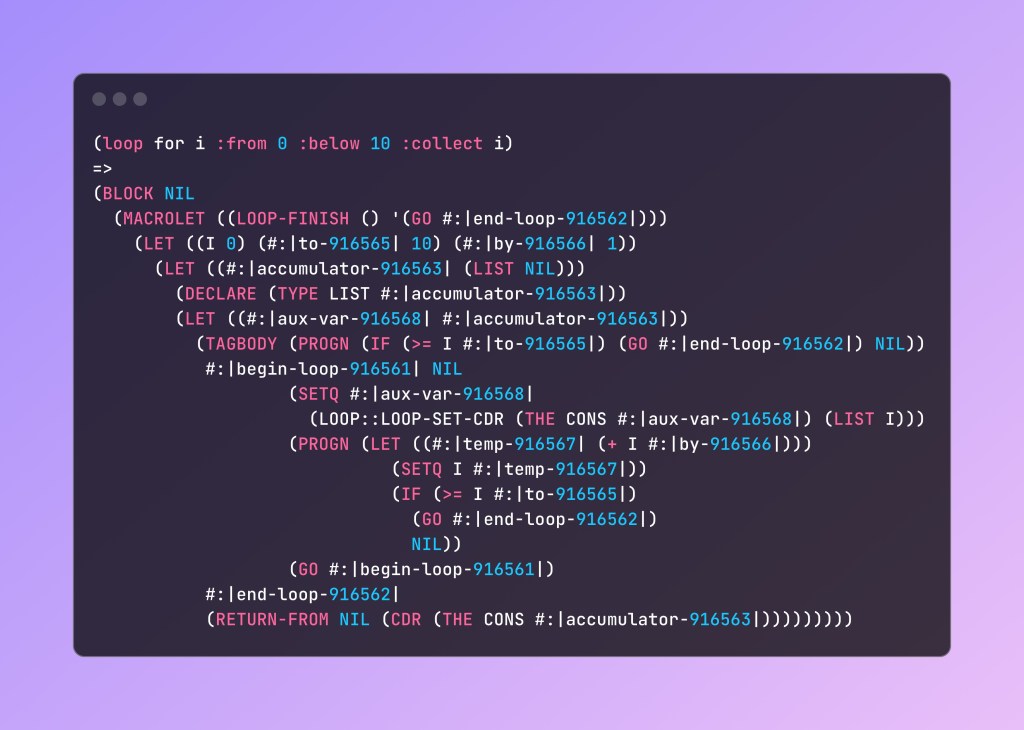
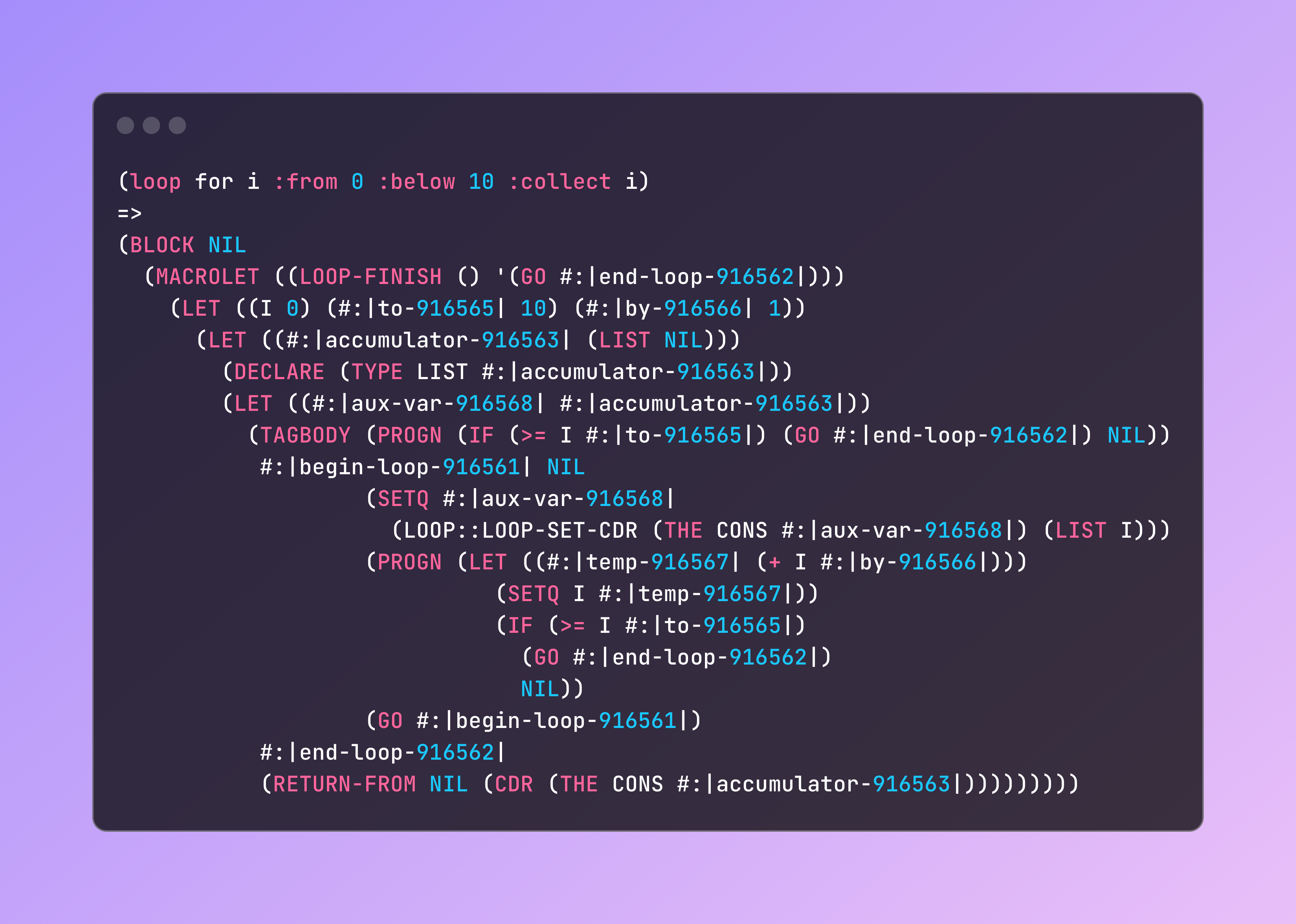
    Lisp’s macro offers incredible power to extend the language easily, with efficiency remaining after expansion. The most famous (notorious) one may be the LOOP:

    (loop for i from 0 below 10 collect i)
    =>
    (block nil
      (macrolet ((loop-finish () '(go #:end-loop)))
        (let ((i 0) 
              (#:to 10) 
              (#:by 1))
          (let ((#:accumulator (list nil)))
            (declare (type list #:accumulator))
            (let ((#:aux-var #:accumulator))
              (tagbody (progn (if (>= i #:to) (go #:end-loop) nil))
               #:begin-loop nil
                       (setq #:aux-var (loop::loop-set-cdr (the cons #:aux-var) (list i)))
                       (progn (let ((#:temp (+ i #:by))) (setq i #:temp)) (if (>= i #:to) (go #:end-loop) nil))
                       (go #:begin-loop)
               #:end-loop (return-from nil (cdr (the cons #:accumulator)))))))))
    

    Yes… it’s also a macro. I cannot write it longer, or your screen will be blown up by the expansion. Temporary symbols (starting with “#:”) are simplified for reading. (Implementation: Lispworks)

    As you can see, there are only basic operators after expansion, which can be transferred to nearly equal amounts of assembly. No run-time compensation. That’s why people say that Lisp is good for “making a new language”.

    Notes: In Common Lisp, there’s also Reader Macro that can define how Lisp reads the source code. You can introduce new syntax to Lisp with it.

    Also, Lisp-style macros are potent to break the barrier between syntactic expressions and function calls — But it’s meaningless for Lisp itself, since Lisp’s source code (S-expressions) is already a valid data structure in Lisp’s runtime.

    Besides, is there anything better than making yourself work less and more comfortable?

    Struggles

    But macro can also become a barrier sometimes. It makes things difficult for those who rely on “stability”.

    One is static code analysis. Macro makes it impossible to analyze Lisp code statically. As we mentioned before, Lisp macros are functions, and you cannot get their results without executing them.

    This yields some consequences. For example, Lisp language support is difficult to integrate into modern IDEs, as it’s difficult for Lisp to cope with the Language Server Protocol (LSP). You need additional real-time communication between the source code and the Lisp image running the LSP server. Many helping features cannot be implemented as well, like type inference and code refactoring.

    But this doesn’t mean there’s nothing to use. There’s some great works like alive-lsp and scheme-langserver. There’re many things we can do.

    Second, too much flexibility can corrupt generative AI, and make it difficult to help with coding. During your development in a certain project, you’ll fund a large set of helper macros and functions, import certain libraries, and finally build a subset language that is specially for your needs. For generative AI, it’s difficult to cope with those new facilities, and you may need special prompts & better models for ideal results.

    Besides, complex macros can easily confuse readers who are new to Lisp, as understanding the logic of expansion and all other prerequisites is costly. This is also a reason for the division of Lisp dialects.

    Many Common Lisp users will stick to the ANSI standard and only use those widespread utility libraries if possible, especially for some open-source projects. That reduces the difficulty for other members to join in development, making it more durable.


    April & May, 2025. Home page, Medium